Content
SeitenreportSEO & Website analysis since 2007
Free SEO checkCheck for free
EN
Choose language
Deutsch English
Menu

For agencies, companies and project teams

Website exams that are in your Everyday work fits.

Maintain customer websites, control changes and prepare advice. Connect Seitenreport results with the next steps in your project.

Start directly with Audit and Suite · Connect individually if required

From the Finding to the Next Measure
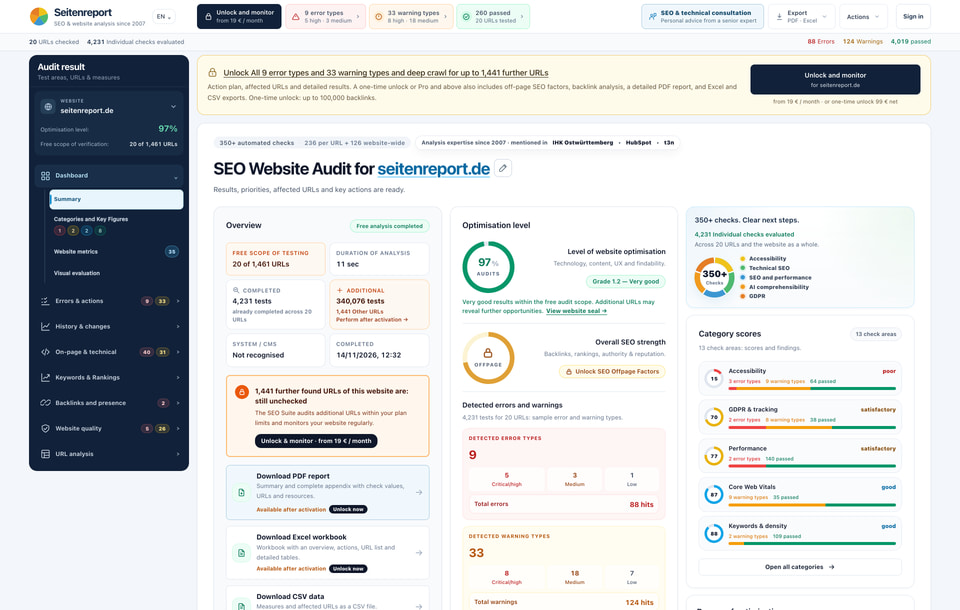
Example audit of seitenreport.de with test scope, priorities and category assessments
TestingPrioritizeImplement

Three Starting Points for Your Daily Work

What task do you want to solve?

Choose your course of action. Each entry point combines concrete work steps with a suitable Seitenreport offer.

01 / Ongoing customer support

Maintain customer websites regularly

Make website quality an integral part of your care. Recurring checks and a comprehensible course provide the basis for the next measures and the customer discussion.

  1. Create projects

    Manage customer websites in the suite and set up appropriate checks and notifications.

  2. Categorize changes

    Go through new findings and the course of the test. Affected URLs and recurring patterns help to prioritize.

  3. Discussion of measures

    Go through results with the customer, assign tasks and re-examine the status after implementation.

Their result: A documented test sequence for your customer portfolio – from the findings to the follow-up check.

02 / Relaunch & website updates

Accompany changes with a before-and-after check

A relaunch, theme update or new template often changes more than one page. Check the publicly accessible website before and after publication and document open points for acceptance.

  1. Stick to initial state

    Perform an audit before the change. Document relevant URLs, redirects and existing findings.

  2. Check the new version

    After publication, re-crawl and especially compare indexability, canonicals, status codes and internal links.

  3. Preparation of the transfer

    Share open findings with affected URLs and check corrected points. The results form a basis for your professional acceptance.

Their result: Comprehensible website findings for development, project management and clients.

03 / Acquisition and initial consultation

With concrete findings in the new customer discussion

Prepare an initial meeting based on the website. An audit makes technical anomalies and possible work packages visible, which you can compare with the goals of the interested party.

  1. Investigating the Website

    Analyse the public website and get an overview of categories, affected URLs and types of findings.

  2. Choosing priorities for talks

    Select a few relevant findings, examine their significance and link them to questions about objectives, system and responsibilities.

  3. Derive project scope

    Together, clarify which measures are useful. An unlocked report supports documentation and quotation creation.

Their result: A concrete basis for discussion for consulting, optimization project or ongoing support.

Sharing results

Customer reports that your team can continue working with.

PDF for conversation and handover, Excel or CSV for further processing: Provide findings, affected URLs and priorities in a comprehensible manner.

Included in the unlocked individual audit · Suite exports from Pro. Own branding and automatic transfers on request.

Systems & Connections

Check your website. If necessary, connect your system.

Public websites can be analyzed without a CMS plugin. If a result is to appear directly in the backend, CRM or customer portal, we plan the connection with you.

WordPress

Check theme and plugin changes on public pages. A display in the backend can be connected individually.

View the use case →

TYPO3

Support editorial, templates and relaunch acceptances with website findings. A backend integration is designed separately.

View the use case →

WooCommerce

Check product, category and content pages and hand over conspicuous page types to technical support.

View the use case →

Shopify and Shopware

Check public shop pages for theme or structural changes. Store-specific connections are individual projects.

View the use case →

Plesk and hosting

Regularly check customer domains and submit results to an agreed support or portal process.

View the use case →

CRM & customer portals

Link selected audit data with customers and projects. Determine fields, permissions and transfers together.

View the use case →

Individual system connections are separate projects. No finished CMS or shop plugins are offered for immediate installation.

From the existing product to your own connection

How much integration do you need?

Directly usable

Audit and Suite

Checking websites, managing projects, tracking changes and exporting available reports. The operation is carried out directly in Seitenreport.

Finding a suitable tariff
API is available

Own application

The documented endpoints provide website data as JSON. Your development sets up the retrieval and presentation in your application.

View API access and endpoints
Individual upon request

Joint integration project

CMS connection, CRM transfer or white label portal: We coordinate triggers, data, permissions and operational scope with you.

Discussion of Connection →

Before boarding

Frequent questions

Do I need an integration to use these workflows?

No. Audits, suite projects, monitoring and the available exports can be used directly in Seitenreport. An individual connection makes sense if results are to appear in your CMS, CRM or customer portal.

Are there ready-made Seitenreport plugins for WordPress, TYPO3 or shops?

Currently, no finished CMS or shop plugins are offered for immediate installation. The public website can be checked without a plugin. A technical integration into your system is coordinated on request and commissioned separately.

What reports can I share with customers?

An unlocked individual audit contains PDF, Excel and CSV exports. In the suite exports are available from Pro. Individual branding, white label reports and special handovers are agreed separately.

Can I automatically start an audit after a deployment?

For own, linked and confirmed suite projects, the API offers a crawl start and results retrieval. The connection to your deployment pipeline must be set up. The suite quota applies and the respective credits apply for paid API retrievals.

Does the audit replace complete project acceptance?

The audit checks website signals and provides a basis for the professional evaluation. Protected areas, business processes, checkout functions and a complete manual accessibility check require own checks.

Start with a website.

Check up to 20 URLs for free and get to know the results on a specific project.